On the tools all day. Not in the office all night.
Talk to your own AI offsider from the ute. It does your invoices and quotes in Xero, chases late payers and handles the admin, so you can focus on the job.

Less paperwork. More time on the tools.
Most small businesses that work on the road do the admin after hours because nobody else will. That is the job we take.
Quotes written at the kitchen table
You finish on site, then start the paperwork. The quote that should have gone today goes on Thursday.
Jobs done but not invoiced
Work is finished and the invoice is still in your head. Cash arrives weeks later than it should.
Money owed, nobody chasing
Following up late payers is awkward and easy to put off, so it does not happen.
The office work, handled while you are on site.
Everything is prepared as a draft. Nothing goes to a customer or into your books until you say so.
Invoices
Tell it the job is done. A draft invoice is waiting in Xero for you to check and send. New customers are added to Xero as you go.
Quotes
Describe the job. It prices a draft from your rates and similar past jobs.
Jobs and reminders
It keeps your job list from what you tell it, your calendar and your accepted quotes, and reminds you about finished jobs you have not invoiced.
Payment follow-ups
Polite reminders to late payers, written for you to approve.
Bank questions, sorted by phone
Reconcile anything you don't recognise to your Ya Offsider account in Xero. Your offsider asks what it was and which account and job, then recodes it. GST follows the rate on that account in your Xero. A daily check flags double-ups, payments coded wrong and missing bills.
Morning rundown
What is on today and what needs you, on your phone before you leave.
Your calendar and inbox
Book and move jobs by voice, get warned about clashes, and have emails sorted with replies drafted for you to approve.
Posts from job photos
Upload photos and it drafts an Instagram schedule for you to approve.
The Ring-In, your AI receptionist
Answers the calls you miss, takes the details, texts you a summary and drafts the follow-up email or quote.
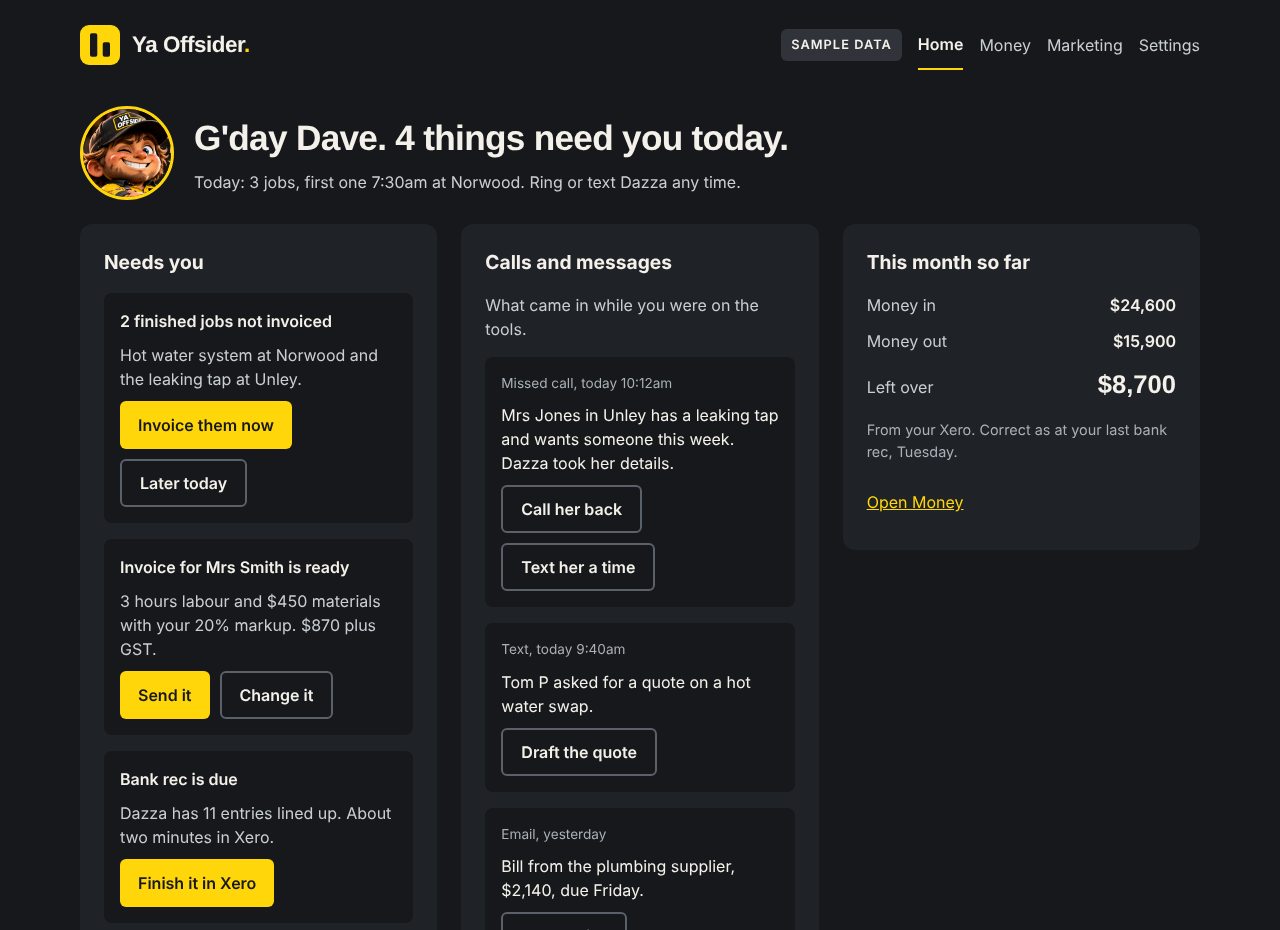
Say it once. It is drafted.
An example call and the dashboard it lands in. Shown with sample data.
Work it out on your own numbers.
We are new, so we will not quote savings we cannot prove yet. Use your own figures instead.
We will publish real results from our first customers once we have them.
Works with the software you already use.
You sign in through each service’s own connect screen. We never ask for or store your passwords, and you can disconnect at any time.
Xero
Invoices, quotes, customers, bills and reconciled bank transactions.
Calendar
Google or Outlook. Your bookings become your job list.
Outlook at launch, Gmail to follow. Sorted, with replies drafted.
Scheduled posts from your job photos.
ServiceM8
Jobs and scheduling from your ServiceM8 account.
Before you sign up
The four marked At launch are what connects on day one. Check that covers what you use. You need Xero, and if you're not on it yet, your offsider walks you through setting it up. The rest are optional.
Use something else?
Ask your offsider. The request comes to us and we give you a straight answer: yes and roughly when, or no, we cannot add it. We do not promise an app until it is working.
Pick who is on your team.
Choose a character, then choose the voice, tone and name separately. Any character can have any voice. Tap one to see it.

The Bloke
A mini tradie in hi-vis and steel caps. Same skills as every other offsider.

The Sheila
A mini tradie with a tool belt and a thumbs up. Same skills as every other offsider.

The Kelpie
A working dog that never knocks off early. Same skills as every other offsider.

The Kooka
A kookaburra with an eye on everything. Same skills as every other offsider.

The Little Ripper
A pocket-sized robot in a hard hat. Clearly AI. Same skills as every other offsider.
The characters are AI mascots, not real staff. More looks for the human characters are planned.
Simple monthly plans. No lock-in.
Free for 14 days. Change plan or cancel any time.
The Offsider
- ✓Your own named offsider, by call and text
- ✓Invoices drafted by voice in Xero
- ✓Reminders for jobs you have not invoiced
- ✓A rundown on your phone every morning
- ✓Jobs pulled from your calendar
- ✓60 minutes of phone calls a month
The Knock Off
- ✓Everything in The Offsider
- ✓Quotes priced from your past jobs
- ✓Late payers followed up for you
- ✓Bank questions sorted and a daily books check
- ✓Emails sorted and replies drafted
- ✓150 minutes of phone calls a month
The Full Crew
- ✓Everything in The Knock Off
- ✓Instagram posts made from your job photos
- ✓Review and referral requests
- ✓Appointment reminders
- ✓300 minutes of phone calls a month
The Ring-In
- ✓Answers missed calls, or every call when you switch divert on
- ✓Tells callers it is an AI assistant for your business
- ✓Takes their details and texts you a summary
- ✓Drafts the follow-up email, text or quote for you to approve
Run out of call minutes? Add 50 for $40. Your bookkeeper or office person gets their own login free on every plan. Behind on your books? We can catch you up from an earlier date, quoted before we start. Reports and reminders are not tax or financial advice.
You stay in charge.
Your offsider works inside limits that you set.
You approve what goes out
Invoices, quotes, messages and posts are drafts until you approve them. You choose what, if anything, can run automatically.
Four levels of permission
Read only, draft, act with your approval, or act within limits you set. You can change them whenever you like.
A record of everything
Every action your offsider takes is logged so you can see what was done and when.
Pause any time
One switch stops your offsider from doing anything until you turn it back on.
Your business only
Your data is kept separate. Your offsider cannot see another business, and theirs cannot see yours.
It is AI, and we say so
There is no call centre behind this. Your offsider is software, and it tells your customers so when it speaks to them.
Frequently asked questions
Is it only for tradies?
No. It works for any small business that does the work and then has to invoice for it: trades, gardeners, mowers, cleaners, pool services, mobile mechanics, detailers and more. Tell it what you do and it uses your words. Every business gets the same features.
Is there a real person behind it?
Your offsider and our support are AI, and they say so. Anything AI cannot sort out, like a billing dispute, a privacy concern or a serious problem, goes to Ya Offsider admin, who will get back to you by email.
Can my bookkeeper or my staff use it?
Your bookkeeper or office person gets their own login, free on every plan. They see the office work; you decide whether they see the money. Logins for your crew, so they can send finished jobs to you for invoicing, are coming soon. Crew will never see your figures.
Do I need to be good with technology?
No. If you can make a phone call or send a text, you can use it. The dashboard is there if you want it.
Do I need Xero?
Yes, but you don't need it set up yet. Ya Offsider works through your own Xero subscription. No Xero? Your offsider walks you through it step by step: signing up, connecting your bank, adding your logo to invoices and linking it to Ya Offsider. Use Xero's standard accounts, or have your accountant set them up. Behind on older months? Sort that later with a catch-up, quoted before we start. Calendar, email and Instagram are optional and you can connect them later. Email works with Outlook at launch, with Gmail to follow. Instagram needs a free Business or Creator account.
Will it send things to my customers without asking?
Not unless you allow it. Everything starts as a draft for you to approve.
What if I use an app you do not connect to?
Ask your offsider or tell us when you sign up. We look at every request and tell you plainly whether we can add it and roughly when, or that we cannot. Until then, only the apps listed under Connects to will work.
How does it know what jobs I am working on?
Three ways. You tell it by call or text, it reads the bookings in your calendar, and it sees quotes your customers have accepted in Xero. Your job list is in the dashboard and you can fix it any time.
How does The Ring-In answer my calls?
You choose when. Divert only the calls you miss, or switch every call across while you are on a job or on holidays, and switch it back when you like. The Ring-In, our AI receptionist add-on, answers in your business name, says it is an AI assistant, takes the details and texts you a summary. It does not quote prices or make promises for you. Follow-ups are drafted for you to approve.
How are late payers followed up?
It checks Xero each day for overdue invoices and drafts a polite reminder by text or email, on the timing you set. You approve each one, or let reminders send on their own. It stops as soon as Xero shows the invoice as paid, and tells you when someone still has not paid after the last reminder.
What if the customer is not in Xero yet?
Give it the name and a mobile or email while you are invoicing. It adds the customer to Xero with the draft invoice, and you check both before anything is sent.
Can I change the character, voice or tone later?
Yes, any time. It keeps everything it has learned about your business.
What if I run out of call minutes?
Your offsider texts you first. Add 50 more minutes for $40, or move up a plan. Nothing is charged until you say yes, and texts and the dashboard keep working.
What do I need to do in Xero?
Reconcile your bank as usual. Anything you don't recognise, reconcile to your Ya Offsider account, which we set up with you on day one. Each day your offsider reminds you or your office person, asks what each one was, and recodes it to the account and job you name. You can split one payment across jobs or accounts.
How is GST worked out?
From your own Xero. Each account has a GST rate, set up by you or your accountant, and your offsider uses the rate on the account you name. It doesn't decide or advise on GST. If you're not sure, it goes on a list for your accountant. Ya Offsider isn't a registered tax or BAS agent and doesn't prepare or lodge your BAS.
Is this tax or financial advice?
No. It prepares and organises on your instructions. Your accountant still advises.
Start your free trial.
14 days free. We are setting up the first Adelaide businesses now. Leave your details and we will be in touch when your spot is ready. Before you pay, check the apps you use are on our list. If one is missing, tell us and we will let you know if we can add it.